> ## Documentation Index
> Fetch the complete documentation index at: https://doc.onetoken.one/llms.txt
> Use this file to discover all available pages before exploring further.

# CherryStudio调用cluade MCP

## 1.CherryStudio下载地址 :

[https://docs.cherry-ai.com/cherry-studio/download](https://docs.cherry-ai.com/cherry-studio/download)

## 2.mcp 配置教程

[https://docs.cherry-ai.com/advanced-basic/mcp](https://docs.cherry-ai.com/advanced-basic/mcp)

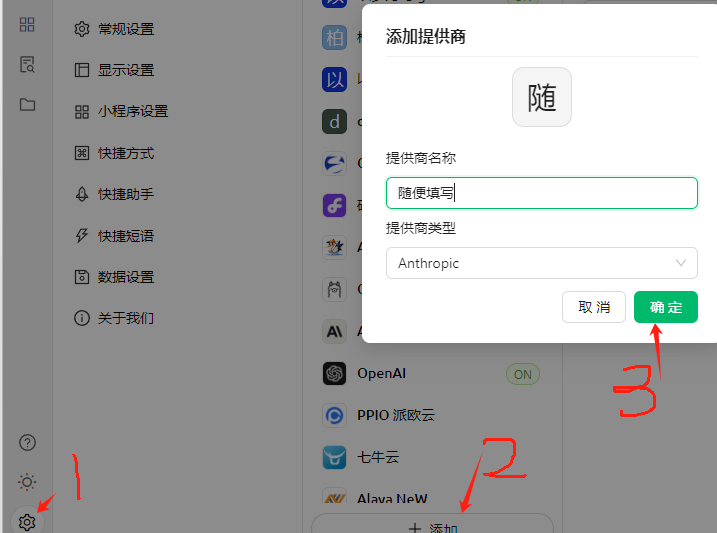
## 3.配置中转
<img src="https://mintcdn.com/onetoken-9a3c590a/Y02IerIYTPVRQQ-L/images/CherryStudioMcp/1.png?fit=max&auto=format&n=Y02IerIYTPVRQQ-L&q=85&s=daf02d57b6a6d7303532bc472b837644" alt="image.png" width="717" height="533" data-path="images/CherryStudioMcp/1.png" />

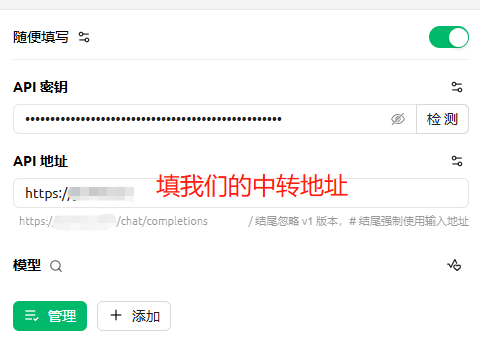
## 4.配置key

<img src="https://mintcdn.com/onetoken-9a3c590a/Y02IerIYTPVRQQ-L/images/CherryStudioMcp/2.png?fit=max&auto=format&n=Y02IerIYTPVRQQ-L&q=85&s=0f94cd92bc7171f466ab7f7f04817f89" alt="image.png" width="480" height="360" data-path="images/CherryStudioMcp/2.png" />

***API地址填写： [https://onetoken.one](https://onetoken.one)***

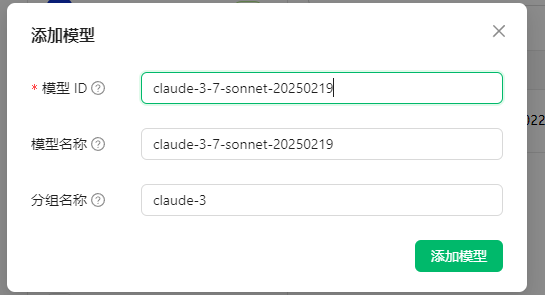
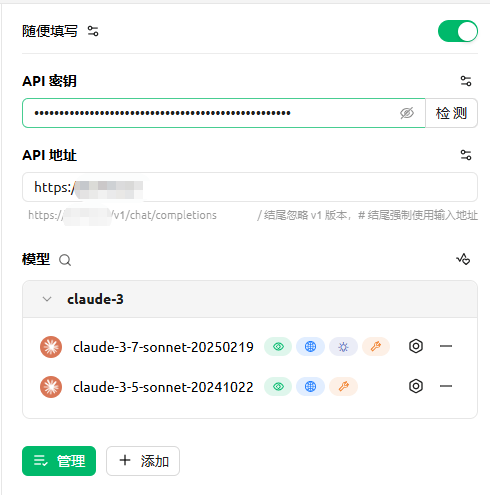
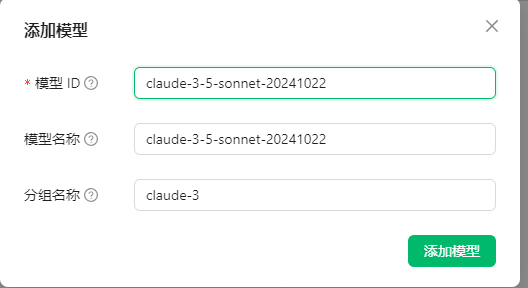
## 5.配置模型
<img src="https://mintcdn.com/onetoken-9a3c590a/Y02IerIYTPVRQQ-L/images/CherryStudioMcp/3.png?fit=max&auto=format&n=Y02IerIYTPVRQQ-L&q=85&s=0b6db0a438ede10c4d8c04011b292f0a" alt="image.png" width="528" height="288" data-path="images/CherryStudioMcp/3.png" />

<img src="https://mintcdn.com/onetoken-9a3c590a/Y02IerIYTPVRQQ-L/images/CherryStudioMcp/4.png?fit=max&auto=format&n=Y02IerIYTPVRQQ-L&q=85&s=c6759fd746b21d7340592fa002317e46" alt="image.png" width="545" height="295" data-path="images/CherryStudioMcp/4.png" />

<img src="https://mintcdn.com/onetoken-9a3c590a/Y02IerIYTPVRQQ-L/images/CherryStudioMcp/5.png?fit=max&auto=format&n=Y02IerIYTPVRQQ-L&q=85&s=ccb2c8cf0efeaa6588cd852430f32e1a" alt="image.png" width="490" height="495" data-path="images/CherryStudioMcp/5.png" />

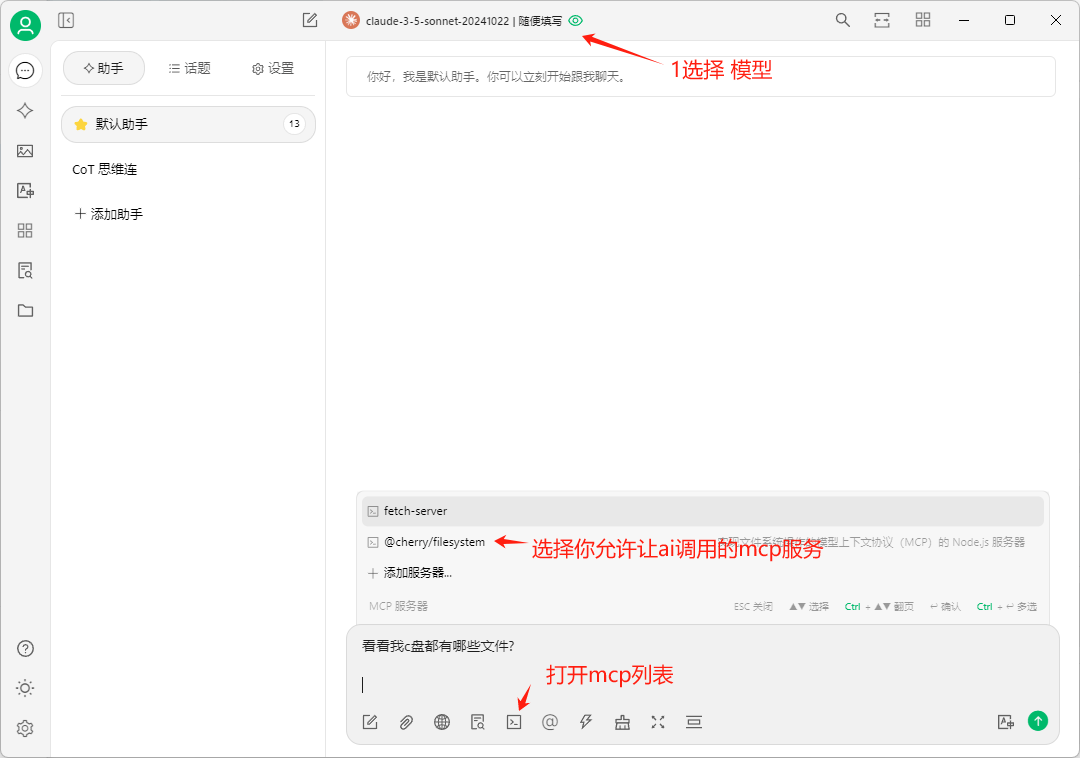
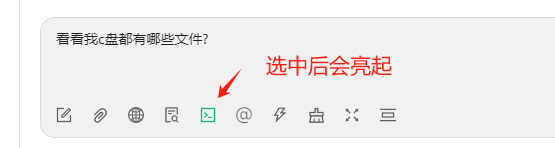
## 6.开启mcp

<img src="https://mintcdn.com/onetoken-9a3c590a/Y02IerIYTPVRQQ-L/images/CherryStudioMcp/6.png?fit=max&auto=format&n=Y02IerIYTPVRQQ-L&q=85&s=ea5ce4244f635aad704480bac9ebc0eb" alt="image.png" width="1080" height="758" data-path="images/CherryStudioMcp/6.png" />

<img src="https://mintcdn.com/onetoken-9a3c590a/Y02IerIYTPVRQQ-L/images/CherryStudioMcp/7.png?fit=max&auto=format&n=Y02IerIYTPVRQQ-L&q=85&s=e429070d407a2df3d519fe8aba4c8fc2" alt="image.png" width="555" height="148" data-path="images/CherryStudioMcp/7.png" />

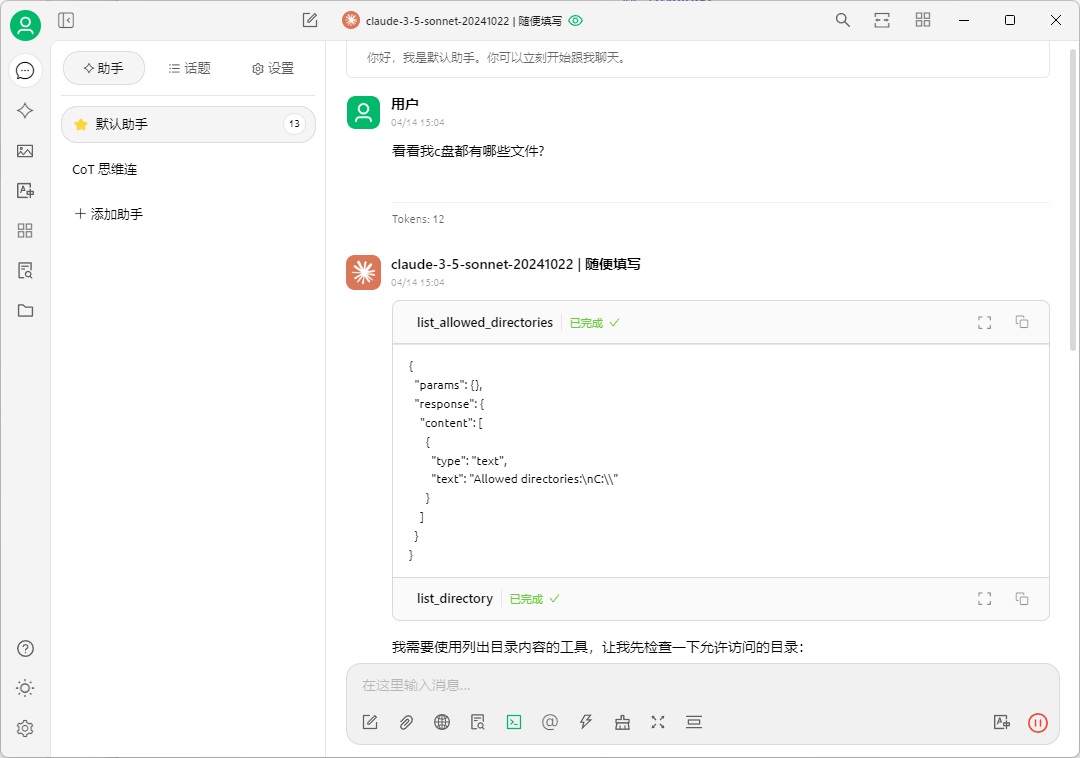
## 发送

<img src="https://mintcdn.com/onetoken-9a3c590a/Y02IerIYTPVRQQ-L/images/CherryStudioMcp/8.png?fit=max&auto=format&n=Y02IerIYTPVRQQ-L&q=85&s=a4675fd360f8352db93f45329a330e6c" alt="image.png" width="1080" height="758" data-path="images/CherryStudioMcp/8.png" />

mcp调用成功